Handwritten notes on a Chromebook, beautifully natural.
Open Chrome, pick up your stylus and write. Your notes, worksheets and lecture audio live on one board.
Start writingfree in Chrome
Open Chrome, pick up your stylus and write. Your notes, worksheets and lecture audio live on one board.
Start writingfree in ChromeSay your school Chromebook came with a stylus, and your notes for one topic keep spilling onto the next page. On FreeFloh the board never runs out of room, so the diagram stays beside the working.
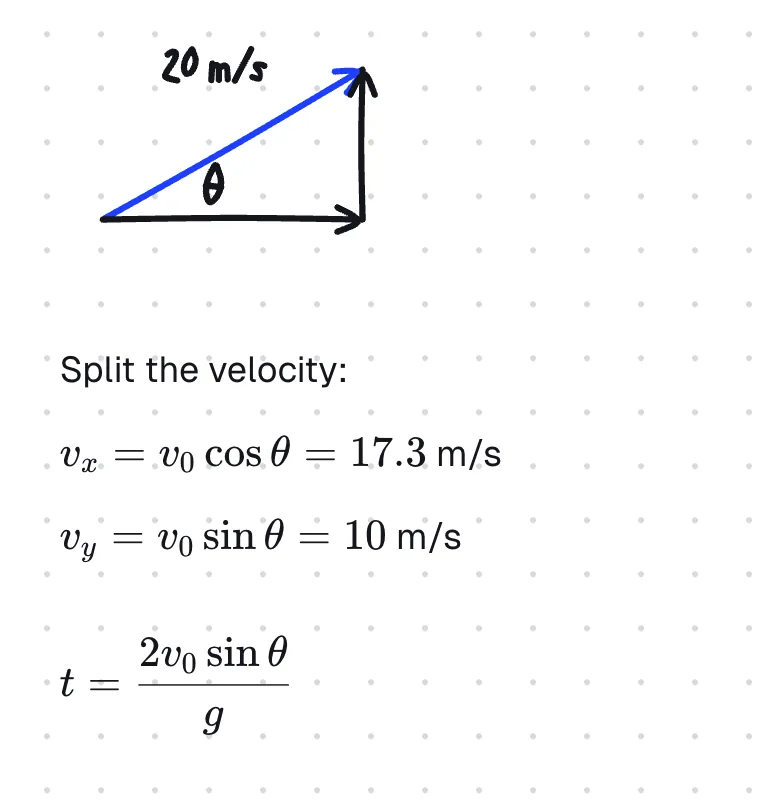
Say your teacher hands out the worksheet as a PDF and explains the answers out loud. Put the PDF on the board, record a voice note while you write, and tap a line of the transcript later to hear that part again.
Say your school blocks every app and extension on the Chromebook. FreeFloh runs in Chrome itself, so there is nothing to install.
Yes, as long as your school lets you open freefloh.com. It runs in Chrome, so there is nothing to install and no extension to approve.
It keeps working once it is open. If the Wi-Fi drops while you write, you keep writing and boards on your device keep saving, although you need a connection to open FreeFloh in the first place.
Yes. Any stylus that works in Chrome writes on the board, and where it reports pressure, lines get thicker as you press.
In Chrome on that Chromebook, as you work. Export a PNG to keep a copy, or use cloud boards on Plus and Ultra.
Yes. Writing, worksheets, typed math and voice notes with transcripts are free.
Open Chrome, open FreeFloh and start writing.
Open FreeFlohfree in ChromeFreeFloh is built by a teacher, for teachers. Used in real classes across dozens of school districts and the world's leading learning sites like nerd-notes.com.