When your student goes quiet
Say you are forty minutes into a session on inclined planes. Your student has the problem in front of them and has stopped talking. Over video, all you can see is their face, and you wait for an answer that may already be wrong.
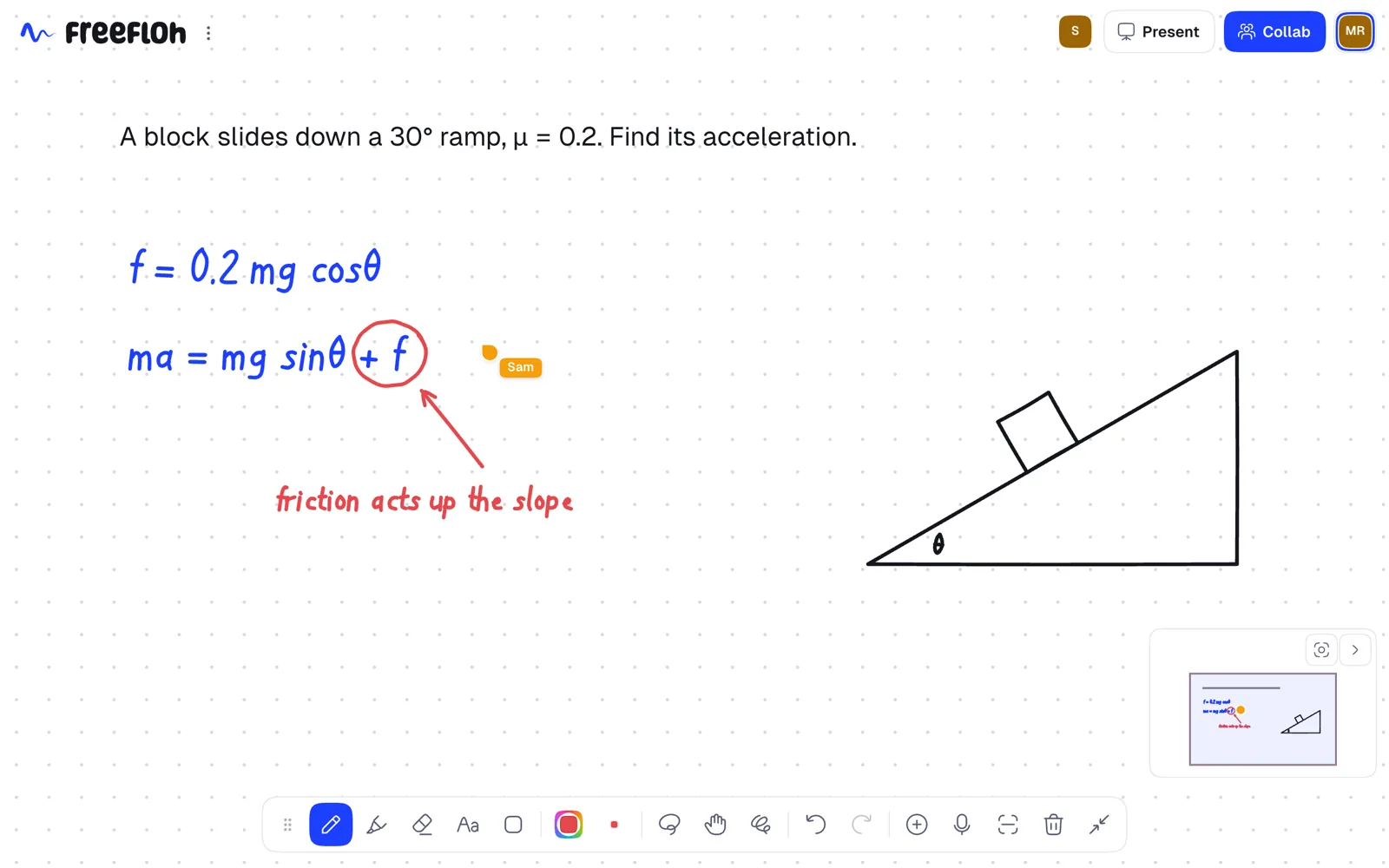
On a shared board, their working appears on your screen as they write it, one stroke at a time. The first line is right. On the second, friction goes in with the wrong sign, and you see it the moment it is written, before three more lines are built on it.
Point at that line with the laser, which your student sees too and which fades on its own. Ask which way friction acts. Let them fix it, or write the corrected line beside theirs in your own color, so both versions stay on the board to compare.
As an AP Physics coach, I've found working on a shared board with my students highly effective.
Set up the board before the session
Ten minutes before the call is enough. Neither of you installs anything, and the conversation stays in Zoom, Google Meet or Teams.
- Put the problem on a board. Type it, paste a photo of the question, or drop in the worksheet as a PDF.
- Save the board to the cloud. Cloud boards come with Plus and Ultra.
- Press Collab to start a FreeFloh Jam, set new people to join as Editor, and copy the link.
- Paste the link into the call chat. Your student signs in with a free Google account to draw, and never pays.
When your student joins, their cursor appears with their name beside it, and their first stroke shows up on your screen as they draw it. They can tap your avatar to follow you as you move to the next problem. If you teach two siblings together, Plus lets both draw with you, and a group class of up to 39 needs Ultra.
Before the next session
Say your student is back a week later. Open last week's board before the call. A cloud board keeps everything on it, so the sign error, your correction and the practice problems after it are where you left them, and you can see which kind of step still trips them up.
Start the new session on a blank stretch of the same board, beside last week's work, with a problem that tests that step again.
Record a five-minute recap
Say your student has a test on Friday and wants to go over the problem again on Thursday night. Before you close the board, open Capture, choose Recording, and talk through the problem in five minutes: point at the sign error, explain the correction and finish the answer.
The video holds the board, your voice and the pointer, and nothing else from your screen. Send it the same evening: downloading is free once you sign in with Google, and on Plus and Ultra you can upload it and send a link that plays in any browser for 60 days, up to 20 minutes long on Plus and 60 on Ultra.
When a parent wants to see
Say a parent asks how the sessions are going. Send them the board's link, and they can watch the next session live without signing in, seeing the working appear as their child writes it. Viewers can't draw, so the board stays your student's. The recap video works for them too.
Habits that help
- Ask your student to pick one color for their working and keep another for your corrections, so you can tell at a glance who wrote what.
- Ask for every step, even the obvious ones, so you can see the line where the reasoning changes.
- Keep one board per topic in a folder for each student, so the next session starts where the last one ended.
More on tutoring with FreeFloh: the online whiteboard for tutoring, drawing together on one board and the whiteboard recorder.
Are you an AP specialist? Nerd Notes is looking for tutors: nerd-notes.com/tutors
Questions
Does my student have to pay?
No. Your student signs in with a free Google account to draw in a FreeFloh Jam, and only the tutor who owns the board pays for Plus or Ultra.
Does FreeFloh have video calling?
No. Keep Zoom, Google Meet or Teams open for the conversation, and share the board's link in the call chat.
How many students can draw with me?
Two on Plus and 39 on Ultra. More people can watch from the link.
Can I look at a past session's board?
Yes. A board saved to the cloud keeps everything on it and opens on any device where you sign in.